
|
Navigation from your Home screen:
 > Full Inventory
Your employee role must have the Reports permission to access reports. See "Roles & Permissions" for more information.
Run the Full Inventory report to view information for all active units currently at your location, including the last date a unit returned from an agreement.
Depending on your employee role, you may be able to save a customized version of the ATMS GEN2.0 Full Inventory Report under a new name.
Criteria for inclusion
A unit is included if it is located at your current location and is active in your fleet. Active units are those that do not have a status of Removed From Fleet, or, for locations with automated fleet import, Pending Import Details, or Removed From Pending Import.
Running the report
 Run the Full Inventory report
- On the Reports dialog, select Full Inventory from the list of reports and click . See "Understanding results" for more information about your report results.
- (Optional.) Adjust sorting options for optimal viewing. See "Customizing Viewing Options" in this topic.
- To export results to a Microsoft Excel file (.xlsx), click . To export results to a PDF, click .
Edit and save the Full Inventory report as your own custom report
Your employee role must have the Edit System Report permission to save a customized version of a system report. See "Roles & Permissions" for more information.
You may want to run a version of an available system report that includes additional columns or statuses or other criteria typically available with custom reports. Depending on your employee role permissions, you can save a custom version of the system report under a new name, then modify the custom report to your heart's content in the Report Builder.
- Run the Full Inventory report, as a jumping off point for your new custom report.
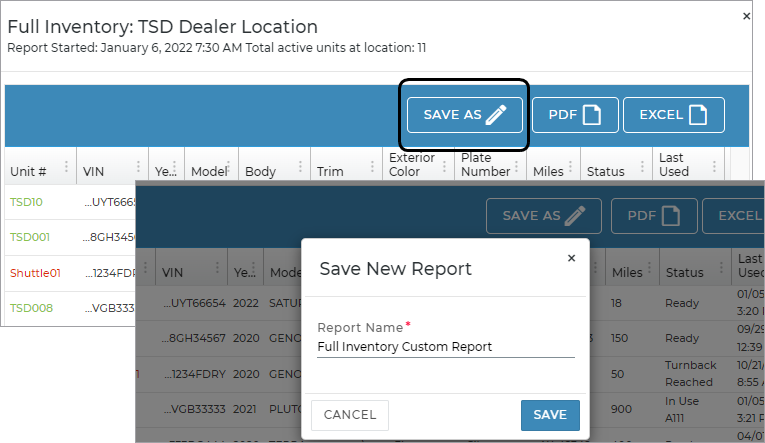
- From your report results, click the button, and enter a name for your modified report.
- Your report is saved and available as a custom report on the Reports dialog, but you are directed to the Report Builder to customize the criteria, columns, grouping, sorting, report access, and more. See "Report Builder for Custom Reports" for more information about this tool.
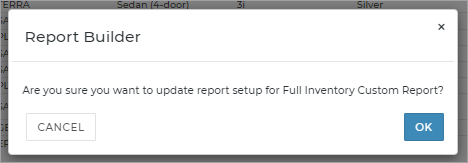
- After you have finished modifying your report in the Report Builder, click . A message is displayed: "Are you sure you want to update report setup for [your Report Name]? Click to continue saving your new custom report.
- Your new, modified version of the Full Inventory report will now be listed as an available custom report on the Reports dialog, so you can run it anytime.
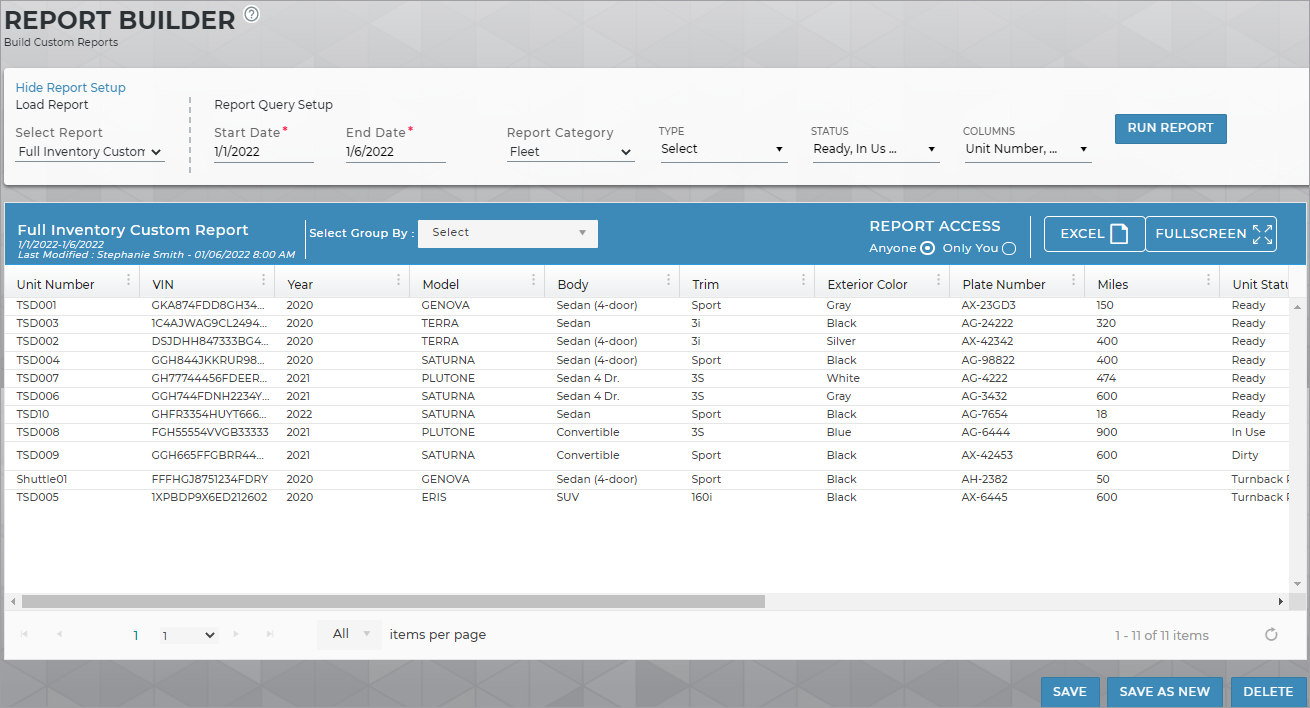
Note: The Start Date and End Date have no impact on results in this report, as all active units at your current location are included, based on their current statuses (that is, not Removed From Fleet, Pending Import Details, Removed From Pending Import).
Customizing Viewing Options
Reports are customizable to fit your viewing preferences. You can adjust this report in all of the following ways:
Choose report columns
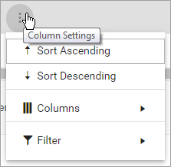
By default, all columns are included in your report results. To hide a report column, click the Column Settings icon ( ) > Columns, and select the column's check box.
Reorder and re-size columns
To reorder columns, click and drag column headers left or right. To expand the size of a column, hover your cursor to the right of the column, and click and drag to increase or decrease the column's width.

Sort results by column
The breakdown of agreements is sorted by Agreement Number, by default. The breakdown of transactions per agreement is sorted by Transaction Date, by default.
To sort results by a column, you can either:
- Click the column header once to automatically sort results in ascending order (
 ); click the header again to sort in descending order (
 ); click the column header a third time to remove the sort.
If no arrow is present in a column header, results are not sorted by that column.
); click the column header a third time to remove the sort.
If no arrow is present in a column header, results are not sorted by that column. - Click the Column Settings icon () and select Sort Ascending or Sort Descending.
Filter results
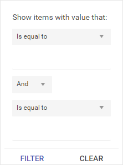
- Click the Column Settings icon () > Filter. Use the lists to indicate the criteria by which you want to filter results, and enter the value to be used for comparison.
- For numeric values: Indicate whether you want to view results that are greater than or equal to, equal to, or less than or equal to a certain value.
- For alphabetical values: Indicate whether you want to view a subset that starts with, contains, does not contain, ends with, or is equal to a certain value.
- To add more criteria, select AND or OR from the list. Then repeat the above steps using the second set of fields to type another value for comparison.
- Click Filter.
Understanding results
The report displays all items on one page, by default. On the bottom of the report, you can choose to view a limited number of items per page, navigate to the next page of results ( ), and refresh your report results (
 ).
).
Key Report Columns
| Column | Description |
|---|---|
|
Unit # |
Unit Number assigned to the unit. |
| VIN | VIN of the unit |
| Year | Year of the unit |
| Model | Model of the unit |
| Body | Body style of the unit |
| Trim | Trim level of the unit |
| Exterior Color | Exterior color of the unit |
| Plate # | License Plate Number of the unit |
| Lifetime Utilization |
Utilization percentage over the unit's lifetime. |
| Miles | Current mileage of the unit |
| Status | Current status of the unit; if In Use, the Agreement Number is displayed |
| Last Loaned | Date and time the unit was last assigned to an agreement |
| Tag # | Unit Tag Number of the unit |
| Connected Car? | Yes or no, to indicate whether the unit has a Connected Car device and Enable Connected Car turned on in the unit record, for locations with Connected Car integration. See "TSD Telematics" for more information. |
| Transponder ID | For locations with TSD Toll Connect (toll processing), the Transponder ID of a transponder associated with the unit, if applicable. |
| Subsidy Status |
Color-coded subsidy status of the unit. See "BMW Subsidy Program Integration" for more information. |
|
Pre-Owned |
'Yes' or 'No', to indicate whether the unit is a Pre-Owned unit. |
Report Sample
Note: This is a generic sample of the report. Additional columns may be available, and column names may differ from sample.

Hover to view the full-sized image.
© 2026 TSD Rental, LLC