Single Sign-On (SSO)
Single Sign-On (SSO) is a convenient and secure method of accessing HMA SRC through a corporate website or portal with a single set of login credentials.
You can use this method to access the web or mobile app, for dealer instances, and the web app for OEM instances.
Key Benefits of SSO
- Convenience. You don't need to remember two sets of credentials.
- Efficiency. Instead of needing to log into two separate applications, you can access HMA SRC through your website or portal.
- Manage security. Password maintenance and password policies are managed by you (the customer) and not by TSD or HMA SRC.
Setup Requirements
- (Optional.) Make Single Sign On (SSO) the only allowed method of logging in.Contact TSD Support at support@tsdweb.com for assistance.
Hyundai Single Sign-On (for Dealers)
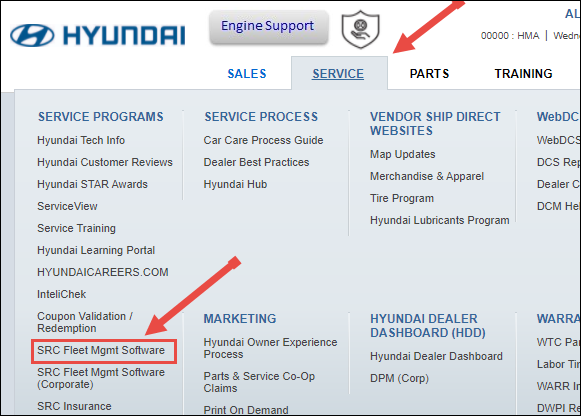
- Log into hyundaiusa.com using Google Chrome on your mobile device.
- Go to the Service tab, and click the SRC Fleet Mgmt Software link.
- If you're on a mobile device, you'll be prompted to open the app.
Restrictions for Single Sign-On Users
SSO employees cannot do the following in HMA SRC:
- Reset passwords of employees or have their passwords reset
- Edit employee roles and permissions
- Add employee records
- Edit employee record information, except for Phone Number, Service Advisor, Driver, and Employee ID fields
SSO users can do the following in HMA SRC, depending on his or her assigned employee role:
- assign an employee role (High, Medium or Low) to an employee
- assign location viewership to an employee
- designate employees as Service Advisors and Drivers, and assign an Employee ID