
|
Navigation from your Home screen:
 >

Your mobile app contains several settings to manage your preferences, choose your card reader and scanning methods, and more.
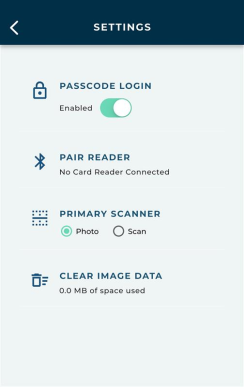
Passcode Login
This turns on biometric authentication (Touch ID or Face ID) for future log-ins.
Pair Reader
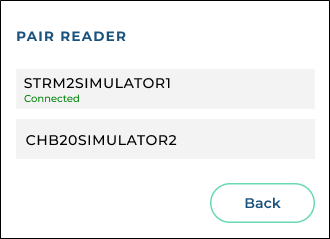
If using a Credit Card Processing integration with a supported card reader, you can pair the reader with this mobile device and install firmware updates.
 How to pair a supported Stripe card reader with your mobile device and install firmware updates:
Primary Scanner
Choose how you want to scan driver's licenses: Photo (to take a photo) or Scan (to scan a barcode).
Clear Image Data
As you use any mobile app, image files (e.g., insurance card photos), may be stored temporarily in the app's "cache". You may want to occasionally save some space on your device by clearing this data back to 0.00 bytes.
© 2026 TSD Rental, LLC