
|
Navigation from your Home screen:
 >

TSD Telematics is sold separately. Contact your TSD Sales Representative at sales@tsdweb.com for more information.
If your fleet is integrated with HMA SRC's Telematics, you can use the mobile app to track your fleet in real-time and retrieve precise, automated fuel / battery and mileage. For more information about this integration, see "TSD Telematics".
How to View a Unit on the Map
Your employee role must have the Access to Map permission to use this function.
You can view a unit in the Telematics Hub map from several places in the app. Choose whichever is most convenient for you.
Note: Restrictions may be in place when it comes to viewing certain units, such as those on agreements in certain states or those on agreements without an electronic signature.
Option 1: Use the Main Menu & Search (Recommended)
This is the fastest way to locate a unit on the Hub.
- Tap > .
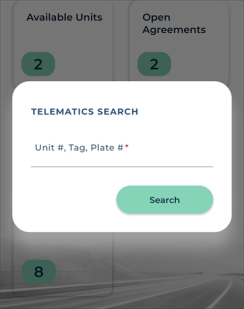
- Enter the exact Unit Number, Tag Number, or License Plate Number.
- Tap .
Search for the exact unit
Option 2. Edit a Unit and View on Map
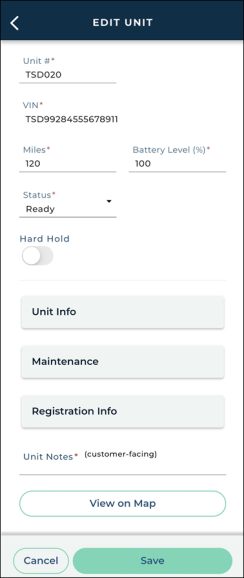
If you already happen to be viewing / editing a unit record, you can access the map from there.
- Tap >
 .
- Look up the unit and tap the record you want to view.
- Tap .
Tap
Explore the Map
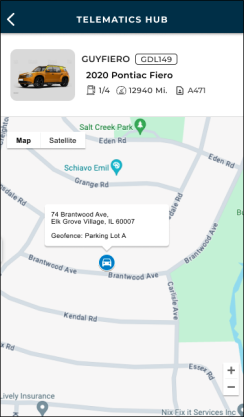
On the Telematics Hub, you can switch between map and satellite views, zoom in and out, and view key vehicle details, including Unit Number, License Plate Number, Year, Make, Model, Fuel / Battery, Miles, and an associated Agreement Number, if the unit is In Use on an agreement.
The web's Telematics Hub has expanded functionality, including filters, alerts, managing geofences, unit history, multiple vehicle views and vehicle searches.
How to Retrieve Fuel / Battery & Mileage
Precise, automated fuel / battery and mileage tracking lets you recoup fuel costs, charge for miles driven, and streamline the agreement process (no need to check the car and manually enter fuel/mileage readings).
A unit's latest mileage and fuel1 are filled in automatically throughout the app: when you view or edit a unit record, assign a unit, and return a unit.
If telematics data can't be retrieved, these fields are filled in with the last known values from the unit record; you're never blocked from continuing. Telematics data newer than the unit's last agreement assignment replaces existing values; older data does not. Fuel readings are rounded to the nearest valid Fuel Level increment for your location.
© 2026 TSD Rental, LLC