
|
Navigation from your Home screen:
 > Uber Ride Report
Your employee role must have the Reports permission to access reports. See "Roles & Permissions" for more information.
Run the Uber Ride report to view key information for your Uber trips.
Criteria for inclusion
An Uber Ride agreement is included in this report if its Pickup Date is within the reporting period, inclusive of the Start Date and End Date.
Running the report
 Run the Report
- On the Reports dialog, select Uber Ride Report from the list of available system reports.
- If necessary, edit the Start Date and End Date for the ride's Pickup Date. By default, the date range is the current month, up to today; you can change the report period, if necessary.
- Click . See "Understanding results" in this topic for help with interpreting your report results.
- To export results to a Microsoft Excel file (.xlsx), click .
Customizing Viewing Options
Reports are customizable to fit your viewing preferences. You can adjust this report in all of the following ways:
Choose report columns
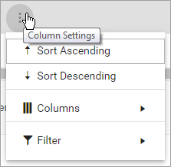
By default, all columns are included in your report results. To hide a report column, click the Column Settings icon ( ) > Columns, and select the column's check box.
Reorder and re-size columns
To reorder columns, click and drag column headers left or right. To expand the size of a column, hover your cursor to the right of the column, and click and drag to increase or decrease the column's width.

Sort results by column
By default, results are sorted by Unit Number of the unit assigned, then by the most recent Checkout Date.
To sort results by a column, you can either:
- Click the column header once to automatically sort results in ascending order (
 ); click the header again to sort in descending order (
 ); click the column header a third time to remove the sort.
If no arrow is present in a column header, results are not sorted by that column.
); click the column header a third time to remove the sort.
If no arrow is present in a column header, results are not sorted by that column. - Click the Column Settings icon () and select Sort Ascending or Sort Descending.
Filter results
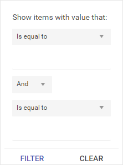
- Click the Column Settings icon () > Filter. Use the lists to indicate the criteria by which you want to filter results, and enter the value to be used for comparison.
- For numeric values: Indicate whether you want to view results that are greater than or equal to, equal to, or less than or equal to a certain value.
- For alphabetical values: Indicate whether you want to view a subset that starts with, contains, does not contain, ends with, or is equal to a certain value.
- To add more criteria, select AND or OR from the list. Then repeat the above steps using the second set of fields to type another value for comparison.
- Click Filter.
Understanding results
By default, results are sorted by Pickup Date / Time.
Key Report Columns
| Column | Description |
|---|---|
| Agreement # | Agreement Number of the trip. |
| Status | Status of the trip. |
| Pickup Date/Time | Pickup Date and Time of the trip. |
| Customer Name | First and last name of the customer. |
| Ride Type | Type of trip (i.e., Scheduled). |
| Pickup Location | City of the Pickup Location. |
| Dropoff Location | City of the Dropoff Location. |
| Vehicle Type | Type of Uber used for the trip (e.g., Comfort, XL, UberX, Green). |
| Amount Due | Total amount due for the trip, based on the most up-to-date cost reported by Uber, plus the TSD service markup. at the time the report is run. Note that the amount due can change up to 30 days after the end of the trip. |
| Cancel Fee | Cancellation fee for cancelling the trip, if applicable. |
| Trip ID | Unique ID used by Uber to identify the trip. |
| Distance | Distance of the trip, in miles. |
| Duration | Duration of the trip, in minutes. |
| RO | Repair Order Number associated with the trip. |
Report Sample
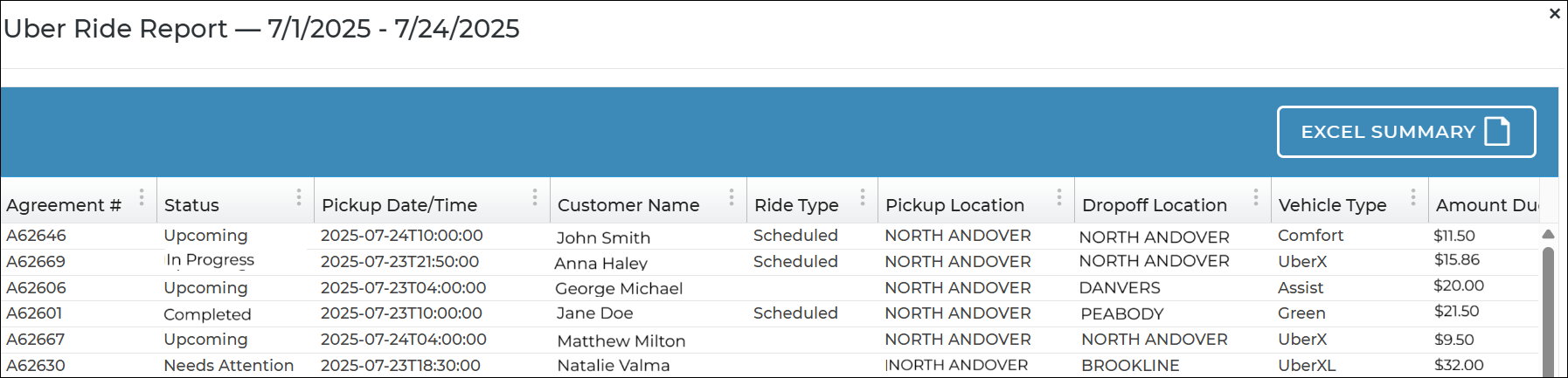
Hover to view the full-sized image.
© 2026 TSD Rental, LLC